If you use an iPhone with dual-SIMs enabled and prefer email for iMessage conversations instead of phone number, you’ll want to update to iOS 26.6.
Since iPhones introduced dual SIM support, share sheet has only shown phone numbers when sharing via iMessage.
Settings app would let you select whether you start new texts via a phone number or email, but this would not change the share sheet. Apple’s help article walks you through the steps to change this setting: If your iPhone sends text messages from your email address.
I prefer email, but this has caused issues for me. Messages app would start threads from my email address, but the share sheet would share it via my phone number. So anyone who did not have either my phone number or email in my contact would see this as a new thread.
I submitted feedback via Apple’s product feedback page earlier this year about multiple people complained or completely missed my messages.
Meanwhile, I had just disabled my second SIM temporarily until I required it. I recently turned it on and noticed that emails were available in the share sheet:
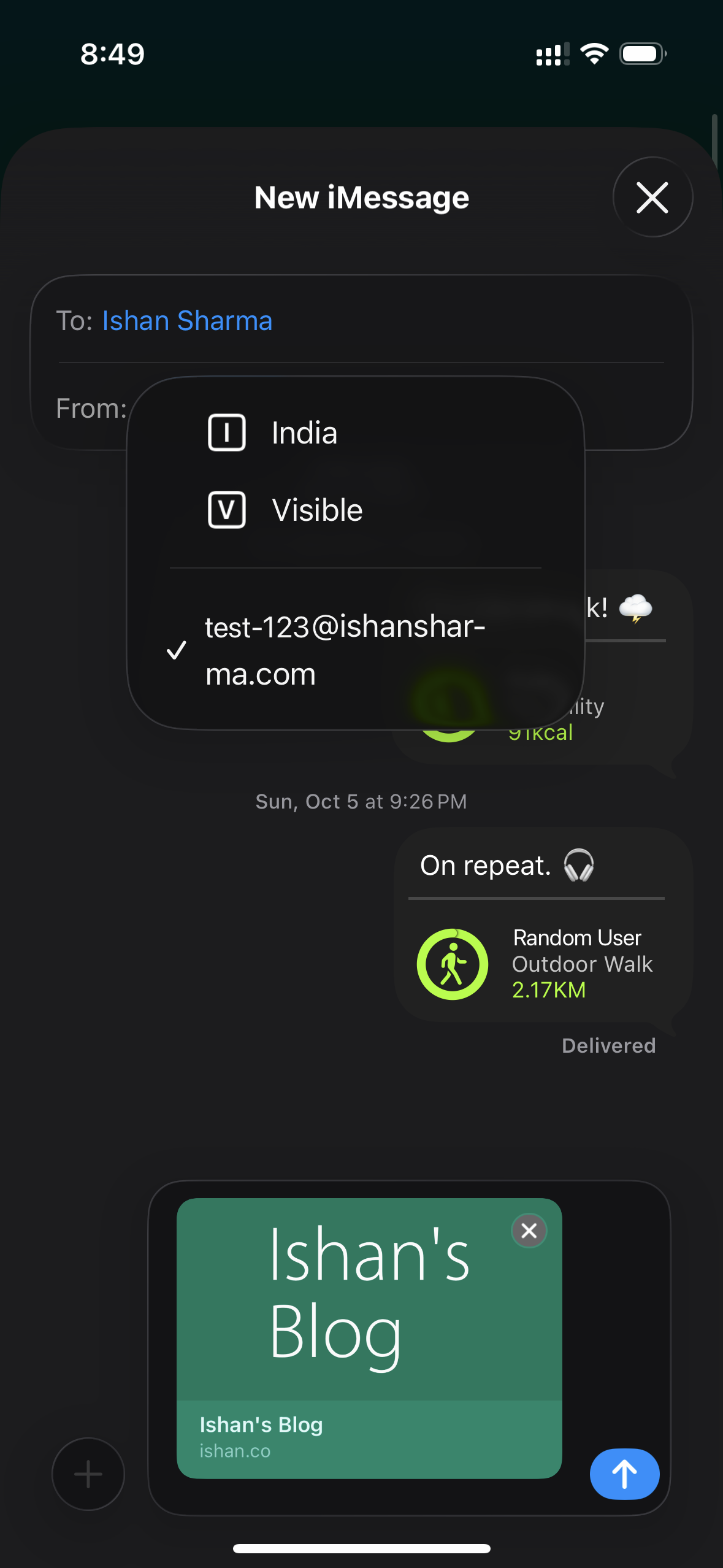
It appears to remember the setting per person, which is a nice little added bonus. I could not locate when this was changed because it’s not in the release notes. I am sure that this was an issue with iOS 26.1, and it isn’t with iOS 26.6.
If you’re in the same boat as me, which I understand is a tiny boat, make sure to update to iOS 26.6. And if you have any similar small issues, submit feedback to Apple, it might just work.